Introduction to campaign tracking
Our etracker e-learning platform offers a free video course on conversions and campaigns.
Click here to go directly to the course:
https://academy.etracker.com/course/conversions-and-campaigns

To evaluate the success of marketing measures, etracker analytics enables the measurement and evaluation of the traffic generated, the engagement on the website and the attributed conversions or conversion values.
- To be able to evaluate campaigns, you need an etracker analytics Pro or Enterprise Edition.
- Conversions must be measured in order to be able to attribute campaign success. There are three ways to measure conversion.
For a basic understanding of how etracker analytics assigns traffic to marketing channels and collects campaign information:
Allocation of traffic to media
If visitors are directed to the website via a link or an ad, etracker analytics automatically records the referrer domain as the origin, including information in campaign parameters.
The domain and campaign parameters are used to group by medium:
- Type-In (Direct): This is the standard if neither a referrer nor a campaign can be assigned. This is the case if the URL is entered directly in the browser or saved links (bookmarks), but also if applications such as email services or messaging apps do not transfer the referrer URL.
- SEO: Links from search engines are assigned to SEO unless campaign parameters are available.
- SEA: Links from search ads are assigned to SEA if the appropriate URL or tracking parameters have been entered. In order to distinguish organic search engine traffic from search ads, it is therefore important to enter URL parameters for tracking.
- Social media: A predefined list of social networks is used for grouping and allocation. A separate medium such as “Paid Social” is recommended for campaign links from ads in order to make a distinction at medium level in the same way as search engine traffic.
- Link/referrer: If the source or referrer does not match any entries in the list of search engines or social networks and there is no campaign parameter for the medium, the visit is classified as a “link/referrer”.
- AI: Link clicks from the AI tools ChatGPT, Gemini, Claude, Copilot, Perplexity, Deepseek, and Grok are attributed to Medium AI.
Allocation of traffic to channels
In contrast to the standard grouping by medium, a separate channel grouping is possible. To do this, assign selected media, referrers and/or campaigns to the respective channels.
Collection of campaign information
Campaign parameters are used to clearly identify traffic sources and campaigns and to measure them in detail. The additional information is appended to the target URL.
To create campaign links, it is best to use the campaign link generator.
The information on the campaign attributes can be transferred as static or dynamic values. To measure Google Ads, for example, it is recommended to use the dynamic parameters that Google Ads supports (ValueTrack parameters). These placeholders are used in the final URLs and automatically filled with the appropriate values.
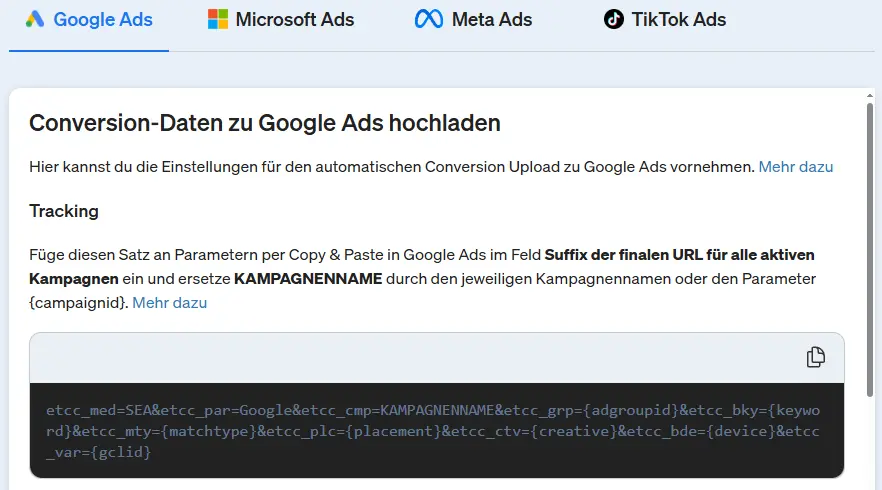
By clicking on Configuration → Conversion upload you will be taken to the recommended parameters for tracking Google Ads, Microsoft Ads, Meta Ads and TikTok Ads.
Attribution & campaign success
Attribution in etracker analytics is used to determine the value and influence of various marketing measures or channels on a conversion. For this purpose, the entire customer journey of the last 30 days before a conversion is taken into account.
The following attribution models are available for assigning success:
Last Ad
100 % of the conversion is attributable to the last contact point before the conversion.
First Ad
100% of the conversion is assigned to the first contact point.
Linear
All contacts receive the same value.
Position (U-shaped or bathtub model)
The first and last contact each receive the largest share of 40%. 20% of the value is divided between the intermediate contacts. If there were only two contacts, both receive 50% of the value.
Independent
All contact points are assigned the full value of the conversion.
Contacts with the “Type-In” medium are only taken into account if no other media are included in the customer journey.
The time allocation in the reports is based on the time of conversion. Only the key figure “Clicks” is independent of the attribution and is assigned to the time of the contact.
Campaign evaluation
Several standard reports are available in the “Marketing” area for analyzing success. Campaign attributes can also be added to almost all other reports by selecting additional dimensions. This is particularly important for the e-commerce reports in order to analyze the success of the campaign by article and product group.
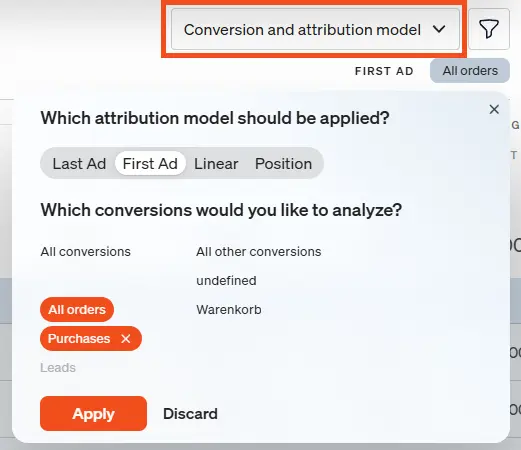
The attribution model can be flexibly changed in the respective reports, as can the conversion(s) to be taken into account.
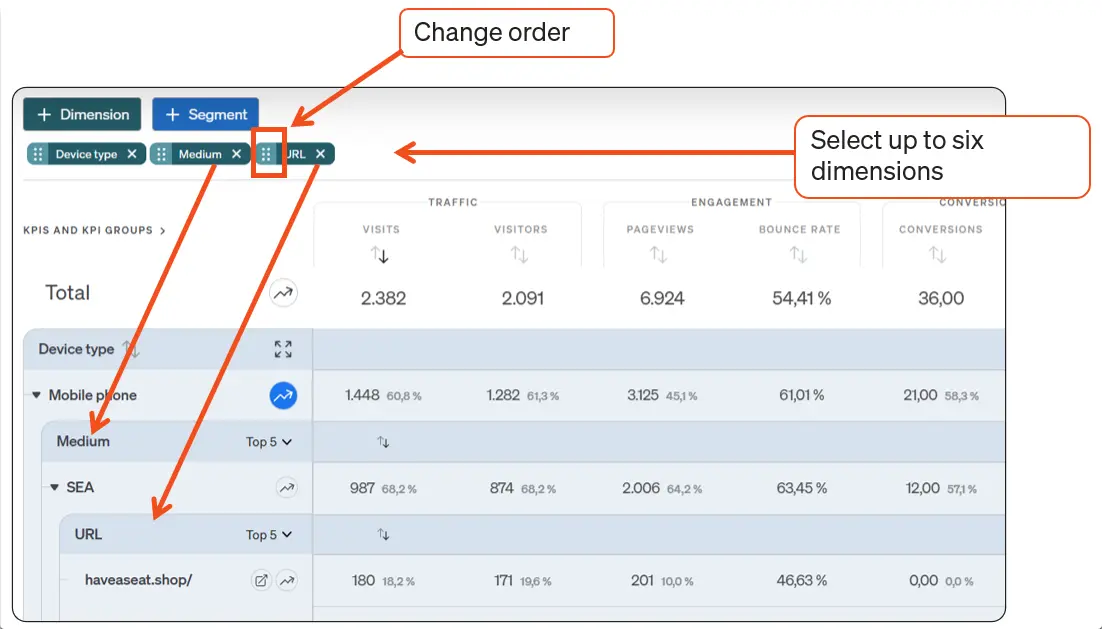
Thanks to the option of adding several dimensions to a report, very dynamic and in-depth drill-down reporting is possible. This makes the interplay of campaign options clear, for example medium, campaign, device type and entry page.
Server-side conversion upload to the marketing platforms
The conversion data assigned to the campaigns can be automatically fed back to marketing platforms such as Google Ads, Microsoft Ads, Meta Ads and TikTok Ads. This serves two purposes:
- Cost information is available in the platform applications. The combination of attributed conversion value and costs enables an analysis of ROAS (Return on Ad Spend), i.e. the profitability of advertising expenditure with the aim of budget optimization.
- Platforms such as Google Ads offer various options for automatic bid optimization in order to manage campaigns more efficiently and achieve the desired goals. In most cases, strategies are chosen that do not maximize clicks, but conversions, conversion values, cost per conversion (target CPA) or profitability (target ROAS). Automatic bidding strategies work best with sufficient conversion data so that the algorithm can learn. The better the conversion signals, the more successfully the bidding strategies are implemented by the platforms’ algorithms. The conversion upload from etracker analytics therefore leads to a significant increase in success compared to conversion tracking via the platforms’ conversion tags (JavaScript snippets), which require consent and are often blocked.
The one-time setup of the server-side data synchronization takes place under Configuration → Conversion upload.